Qustodio Parental Control App
- 3.6
- Rating
- 5.00M
- Installs
- Free
- Price

 Analysis by App-foxy
Choosing a parental-control app is less about finding the longest feature list and more about deciding what kind of help your family actually needs. Some parents want a simple bedtime timer, while others need a clearer view of how a child’s phone is being used, which apps are available, and where the device is. I spent time looking at Qustodio Parental Control App with that decision in mind, rather than treating it as a one-tap solution to every parenting challenge.
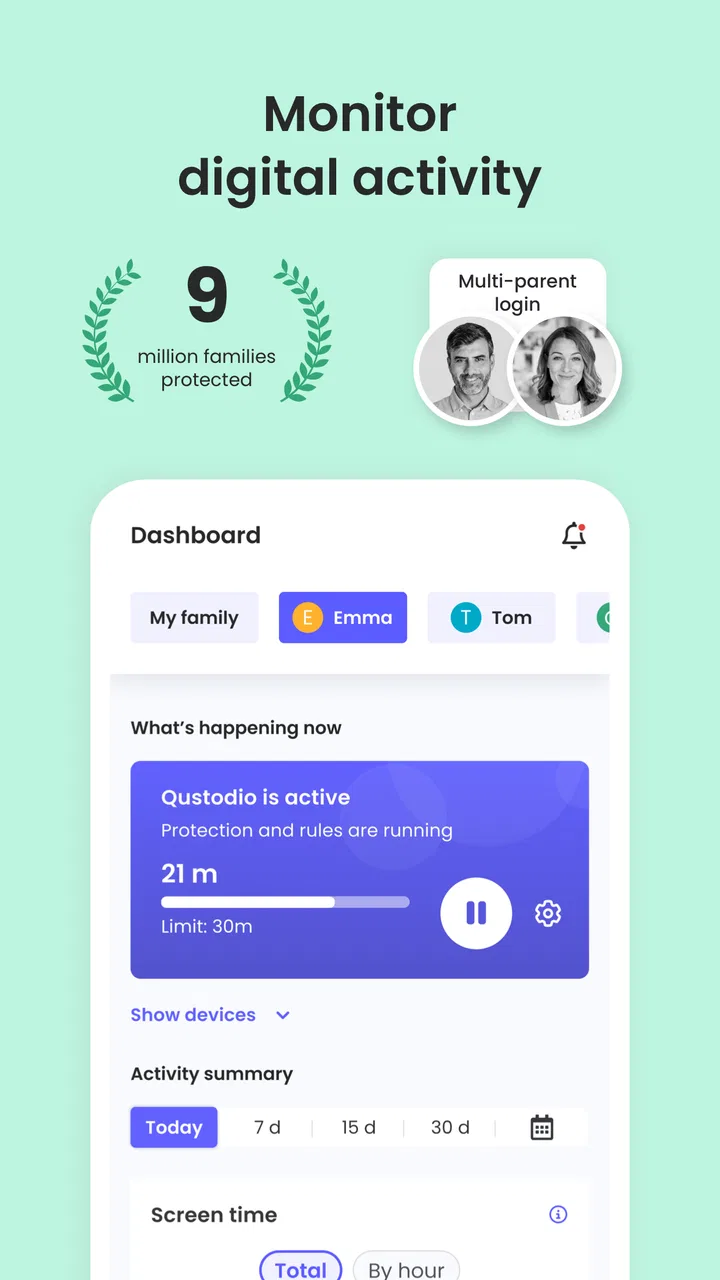
Developed by Qustodio LLC, this free parenting app brings screen-time management, app and website blocking, monitoring, and location tracking into one place. That combination makes it more ambitious than a basic device timer. It can suit parents who want one dashboard for several kinds of digital boundaries, but it also asks for more setup, more conversations, and more trust than a lightweight screen-time tool.
The app is available for Everyone and supports Android devices from version 7.0 onward. Its current version is 182.33.0, and the Android listing shows more than five million installs, so it is not an obscure experiment. Still, its average rating of 3.6 from roughly twenty-two thousand ratings suggests a mixed experience. That feels important: the idea is useful, but families should approach it with realistic expectations.
You May Also Like

 Blood Strike: 2.5 Anniversary
Blood Strike’s Loadouts Turn Every Drop Into a Tactical Gamble
A close look at Blood Strike’s custom loadouts: how fast access to signature weapons reshapes its battle royale rhythm, rewards preparation, and narrows the gap between fights.

 Pandora - Music & Podcasts
Pandora’s Music Is Easy to Start, but Harder to Recover
Pandora’s strength is its low-effort path from a seed to a station. Its weak spot is how much confidence it asks you to place in connection, setup, and quiet recovery.

 8 Ball Pool
 Is Built on Rivalries, Rematches, and Routine
A close look at the rivalries, rematches, shared routines, and unanswered safety questions that turn a quick pool match into a persistent mobile community.

 Samsung Music
’s Quiet Strength Is Playing What You Already Own
Its reach comes less from spectacle than from dependable access to a personal library. That simplicity is both the app’s strongest retention engine and its ceiling.

 AccuWeather: Weather Radar
AccuWeather Review: A Quick, Clear Forecast for Everyday Decisions
For everyday plans, the best forecast is the one you can understand quickly. AccuWeather makes rain timing, radar, and local conditions easy to act on, with a few trade-offs.

 Hill Climb Racing
Why Hill Climb Racing Still Turns Crashes Into One More Run
A tiny car, a bumpy hill and one more upgrade: Hill Climb Racing keeps resurfacing because its simple chaos makes every near-miss feel personal.
More From Our News Desk



What to decide before installing Qustodio
The first question I would ask is whether you need screen-time control, supervision, location awareness, or all three. If a child simply spends too long playing games at night, the controls already built into a phone may be enough. Installing a dedicated parenting app adds another layer to manage. Qustodio becomes more compelling when the problem involves several apps, web access, device routines, and a parent who wants these pieces viewed together.
The second question is the child’s age and level of independence. A younger child may accept a clear routine such as “school hours are for school apps” more easily than an older child who sees monitoring as an invasion of privacy. The Everyone age rating describes the app’s store classification, not the emotional readiness of every family. I would introduce it as a safety and routine tool, not as invisible surveillance.
It also helps to decide what success looks like. If your goal is to stop a particular website, app blocking matters more than location tracking. If the main concern is a child arriving safely at an activity, location features may be the reason to choose this app. If arguments happen because nobody knows how much time was spent on a phone, monitoring and scheduled limits may be more useful than a strict permanent ban.
Before relying on it, I would test the setup during a quiet weekend. Add the child’s device, apply a modest rule, and confirm that the result matches what you intended. This is a practical step that many store descriptions skip. A rule that is too strict can create immediate conflict, while a rule that is too loose gives parents false confidence. Starting small makes it easier to see whether the family can live with the arrangement.
How the main tools work together
Qustodio’s appeal comes from the way its controls cover different parts of a child’s digital routine. Screen-time limits address duration. App and website blocking address access. Monitoring helps a parent understand activity. Location tracking adds a physical-world element. None of these should be treated as a substitute for conversation, but together they can give a parent a more organized way to respond.
I found the distinction between blocking and monitoring especially important. Blocking is a direct boundary: something is unavailable or restricted. Monitoring is more observational, allowing a parent to notice patterns before deciding what to change. For example, a child who repeatedly reaches a distracting site during homework may need a schedule or a discussion, not an all-day ban. Using observation first can prevent overcorrection.
A useful workflow is to create a short list of non-negotiables and leave the rest flexible. You might restrict a few clearly unsuitable websites, establish a nighttime screen routine, and use activity information to review the arrangement later. This is more sustainable than trying to control every minute and every tap from the first day.
The strongest use of Qustodio is not maximum restriction; it is turning scattered parental concerns into a manageable routine. That difference matters. Parents who expect the app to enforce every family rule automatically may become frustrated, while parents who use it as a framework can get more value from the same controls.
A realistic family routine
Imagine a child who uses one phone for school messages, video watching, games, and travel to an after-school activity. The parent is not worried about every individual app, but bedtime is becoming unpredictable and the child sometimes visits distracting websites while studying. With Qustodio, the parent can begin by setting a reasonable screen-time structure, blocking the most troublesome web destinations, and checking activity instead of guessing.
On the day of the activity, location tracking can answer a practical question about the device’s whereabouts. That does not remove the need to teach the child how to travel safely or to call when plans change. It simply gives the parent another source of information. Later, the parent can review whether the restrictions helped or whether they created problems for schoolwork.
The non-obvious lesson is that rules should be tested against real life. A restriction that works on a school night may be inconvenient during a family trip. A location feature may be reassuring in one situation and unnecessary in another. I would review the setup after a week rather than treating the first configuration as permanent.
What I liked about the all-in-one approach
Compared with using separate phone settings, browser controls, and a location-sharing tool, Qustodio offers a more coherent starting point. The parent does not have to remember which concern belongs to which utility. That matters in busy households, especially when more than one child has different routines.
The app is also useful for gradual parenting. You can begin with visibility, then introduce a limit when a pattern becomes clear. That is less confrontational than announcing a complete digital lockdown without knowing what is actually happening. In my view, this makes the monitoring side just as valuable as the blocking side.
Another strength is its broad purpose. A basic timer may help with duration but says little about web access or a device’s location. Qustodio is designed for parents who want those concerns considered together. The store summary specifically presents screen time, app and web blocking, monitoring, and location tracking, and that combination is the reason to look at this app rather than a single-purpose setting.
The free entry point also lowers the barrier to trying the concept. However, the presence of in-app purchases means “free” should not be interpreted as every possible capability being included without cost. The listed purchase range runs from $34.99 to $137.95 per item. I would examine the purchase screen carefully before building a long-term family routine around a feature that may require payment.
Where another kind of solution may fit better
Qustodio is not automatically the best choice for every household. If you only need a bedtime reminder or a daily usage limit, the phone’s native controls may be simpler and less intrusive. They are already part of the device, so there is less to install and explain. Choosing a larger monitoring system for a small problem can create unnecessary work.
Families focused mainly on location may prefer a dedicated location-sharing service, especially if they do not want web and app supervision. A single-purpose option can be easier for relatives to understand and may keep the conversation centered on safety rather than phone behavior. I would choose that route when location is the only meaningful requirement.
There is also a trust trade-off. Older teenagers may respond better to a jointly agreed digital-wellbeing plan than to detailed monitoring. Qustodio can support boundaries, but it cannot decide whether those boundaries are appropriate for a changing relationship. If the family is already struggling over privacy, installing it without discussion may make the conflict worse.
Parents should also consider the child’s device mix and the household’s tolerance for troubleshooting. A multi-purpose app requires consistent configuration and occasional checking. If nobody has time to maintain rules, a simpler tool may be more effective because it is more likely to remain correctly configured.
Setup habits that prevent avoidable frustration
I would begin with the parent’s own goals written in plain language: protect sleep, reduce distractions during homework, limit unsuitable web access, or know where a device is during a journey. Then I would map each goal to one feature. This avoids switching on every control simply because it exists.
Next, I would tell the child what is being managed and why. Even with younger children, a short explanation is better than a mysterious device change. For older children, agree on what happens when a rule blocks something needed for school or an unexpected plan changes. A clear exception process is more useful than pretending every day will follow the same pattern.
A less obvious but valuable tip is to keep an eye on false positives. A website may be distracting in one context but useful in another, and a strict schedule may interfere with a late school task. When a rule causes friction, adjust the rule before blaming the child or the app. The point of monitoring is to improve judgment, not to collect evidence for an argument.
I would also avoid using location tracking as a replacement for communication. It can help answer where a device is, but a map cannot explain why plans changed, whether the child is safe, or whether the phone was left somewhere. Treat it as one piece of information and preserve the habit of checking in directly.
The real cost of changing your setup
Switching to Qustodio is not only a download decision. The cost includes learning the controls, configuring the child’s device, explaining the rules, and revisiting them when school, travel, or age changes the situation. That investment is worthwhile when several concerns are connected. It is harder to justify when you need only one small restriction.
There is a financial decision as well. The app is listed as free, but in-app purchases range from $34.99 to $137.95 per item. I would first establish whether the free experience covers the specific routine you want. If a paid option becomes necessary, compare that cost with the inconvenience of combining several simpler tools, not just with the price of another app.
Moving away from an existing solution can also create a gap in supervision. I would not remove the old arrangement until the new one has been tested on the child’s actual device and daily schedule. Run through school access, bedtime, travel, and an intentional attempt to reach a restricted destination. This kind of handover test is more useful than assuming the installation completed successfully.
Who should choose it, and who should skip it?
I would recommend Qustodio to a parent who wants a central approach to parental controls, especially when screen time, web access, app access, activity awareness, and location all matter. It is a sensible candidate for families that are willing to discuss rules and adjust them rather than expecting a technical barrier to solve a relationship problem.
I would be more cautious if your household needs only a basic timer, if the child is old enough that detailed monitoring would seriously damage trust, or if nobody can spare time for setup and review. In those cases, built-in device controls or a narrower safety tool may be a better fit. More features do not automatically mean a better experience.
The mixed average rating of 3.6 is a reminder to keep expectations grounded. An app can have a useful design idea and still feel demanding in everyday use. I would treat the rating as a reason to test it carefully, not as a final verdict. The right question is whether its particular combination of controls matches your family’s actual problem.
My recommendation after weighing the trade-offs
Qustodio Parental Control App is a practical decision for parents who want more than a simple screen-time counter. Its value lies in combining several forms of supervision and allowing a family to build a routine around them. I especially like the possibility of starting with observation, adding targeted limits, and using location information only when it serves a clear safety purpose.
I would not install it as a secret replacement for parenting, and I would not activate every restriction on the first day. Start with one or two goals, explain them, test the result, and review the arrangement after real use. That approach gives the app a fair chance while protecting the child from arbitrary rules and protecting the parent from unnecessary complexity.
For families seeking a broad, organized parenting toolkit, Qustodio Parental Control App is worth trying. For families seeking one uncomplicated function, a simpler alternative may be the wiser choice. My final recommendation is therefore positive but conditional: choose it when you need several connected controls and are prepared to manage them thoughtfully, not merely because the app promises to monitor a phone.
FAQs for Qustodio Parental Control App
01What features does Qustodio offer to help parents monitor their child's online activity?
Qustodio provides a comprehensive suite of features for parental control, including web filtering, screen time management, and app monitoring. Parents can track their child’s location, block inappropriate content, and receive daily activity reports. The app also allows parents to set time limits on device usage, ensuring a balanced digital lifestyle for their children.
02How does Qustodio ensure the privacy and security of my child’s data?
Qustodio prioritizes privacy and security by encrypting all data transmissions. The app complies with global privacy standards like GDPR to ensure that your child's information is protected. Qustodio does not sell user data to third parties, and parents have full control over what data is collected and how it is used.
03Is Qustodio compatible with multiple devices and platforms?
Yes, Qustodio is compatible with a wide range of devices and platforms. It supports iOS, Android, Windows, Mac, and Kindle, allowing parents to monitor multiple devices from a single dashboard. This cross-platform compatibility ensures that parents can keep track of their child's digital activities regardless of the device they use.
04Does Qustodio offer real-time alerts for unusual activities?
Qustodio provides real-time alerts to notify parents about unusual or concerning activities. For instance, if your child attempts to access blocked content or spends excessive time on social media, the app will send an immediate alert. This feature helps parents respond promptly to potential issues and manage their child's online behavior effectively.
05What are the subscription options available for Qustodio?
Qustodio offers both free and premium subscription plans. The free version includes basic features like web filtering and activity monitoring, while the premium version provides access to advanced features such as location tracking, app blocking, and multiple device support. Subscription plans vary in price based on the number of devices and desired features.
Pros
- Comprehensive activity reports for parents.
- Supports multiple device management.
- Intuitive and easy-to-use interface.
- Customizable screen time limits.
- Real-time location tracking available.
Cons
- Limited features in the free version.
- Some features require internet connection.
- Occasional sync delays between devices.
- No support for older operating systems.
- More expensive than some competitors.

Qustodio Parental Control App
Gallery